
Must-Have Desk Gadgets for a Cleaner and Smarter Setup
A productive, comfortable desk starts with two things: order and the right tools. The right gadgets help you reduce clutter, protect equipment, and streamline daily tasks so you can focus on meaningful work.
Over the next sections we’ll cover practical, budget-friendly gadgets and small upgrades that make a measurable difference. If you want to explore a curated selection of relevant devices and accessories, start with the Tech & Gadgets category for wired hubs, peripherals and proven desk tech.
Cable management and docking: the foundation
Cables are the quickest way to turn a neat desk into a tangle. Start with a compact docking station or USB hub to reduce the number of direct connections to your laptop. Pair that with adhesive cable clips, a cable sleeve, and a vertical charging stand to route power and peripheral cables neatly behind a monitor or under the desk. For laptops without enough ports, a multiport hub saves desk surface and keeps peripherals organized.
Compact cleaning tools to keep surfaces clear
Dust and crumbs accumulate in keyboard gaps and around monitor bases; a small selection of cleaning tools keeps a setup looking sharp. A can of compressed air, a microfiber brush, and a handheld vacuum with narrow tools are all you need. For a tight, targeted clean that reaches behind monitors and into crevices, consider a set of vacuum attachments designed for home cleaning, like the 32mm vacuum attachments—they work with many standard handheld and canister vacuums to clear dust without disassembly.
Ergonomic stands and risers for screens and phones
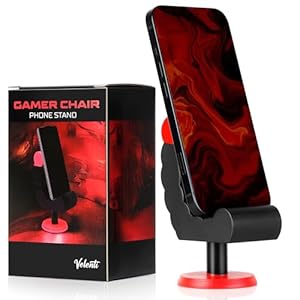
Raising your screen to eye level reduces neck strain and frees up under-monitor storage. A solid monitor riser with drawers or an aluminum laptop stand improves airflow and gives you space for notebooks or a keyboard when not in use. For phones, a stable, compact stand keeps your device visible for notifications and quick calls; the VELENTI Piano Phone Stand is a simple, elegant option that works well on crowded desks and sits neatly beside a keyboard.
Tripods and mounts for content, calls, and stability
Whether you record quick videos, stream, or take better product photos for work, a tall, stable phone tripod turns your desk into a mini studio. A tripod with an adjustable phone mount and remote makes it easy to switch between vertical and horizontal shots and improves framing for video calls. For flexible height and reliable stability, pick a model like the Cellphone Tripod, 71″, which gives enough reach for overhead shots and solid support for long sessions.
Smart cameras for desk monitoring and better video calls
Adding a compact smart camera to your setup can serve two purposes: higher-quality video for meetings and a quick view of a work area for remote collaboration or security. Choose a camera that supports 1080p, two-way audio, and low-light performance so meetings look professional without extra lighting. The TP-Link Tapo 1080P Indoor Security Camera is an accessible option that doubles as a desktop video camera with motion alerts and two-way audio for quick check-ins or recording demos.
Audio that helps you focus and sound professional
Clear sound improves concentration and makes meetings less fatiguing. For open-plan spaces, noise-isolating on-ear or over-ear headphones are essential. If you need a reliable, affordable choice for calls and music, wired headphones with good mid-range clarity and a microphone do the job without Bluetooth pairing hassles. The JBL Tune 500 headphones balance comfort and clarity for prolonged use.
Air quality and desk scent for focus
Small sensory details affect perceived comfort and productivity. A minimalist diffuser or reed set provides a consistent, subtle scent that helps you feel centered without overpowering coworkers or family members. Choose natural essential oil blends and place them away from direct fan airflow so the fragrance disperses evenly. A desktop-friendly option like the flower reed diffuser set brings a clean, calm scent while keeping your workspace visually tidy.
Laptop and port strategy: choose devices that simplify
Your primary computer should reduce friction: fast wake times, enough ports, and predictable thermal performance. If you use a laptop as your main workstation, pick one with a full keyboard and enough RAM for multitasking; a capable model such as the Lenovo V15 Laptop computer covers common office needs and pairs well with docks to extend ports without extra cable clutter.
Small accessories that make a big difference
Beyond the big items, keep a few low-cost tools on hand: a screen cleaner kit, a wrist rest, a small desk tray for keys and wallet, and a cable label set to identify chargers. These small touches reduce friction during transitions and prevent lost items from interrupting workflow.
Quick checklist: Essentials for a cleaner, smarter desk
- Docking station or USB hub
- Adhesive cable clips and a cable sleeve
- Compact vacuum attachments and cleaning brush
- Monitor riser and phone stand
- Phone tripod for video calls
- 1080p desk camera with two-way audio
- Comfortable headphones with mic
- Subtle reed diffuser or small air purifier
- Screen cleaner and a small desk tray
Conclusion — practical takeaway
Start by removing visual clutter: consolidate ports with a hub, secure cables, and add a phone stand and small cleaning tools. Then pick one smart upgrade (better headphones, a tripod, or a camera) that directly improves daily tasks. Small, targeted purchases yield the best ROI for a cleaner, smarter desk.
FAQ
Q: Which single gadget gives the most immediate improvement?
A: A good hub or docking station reduces cable clutter and makes connecting peripherals zero-friction—this often yields the fastest payoff.
Q: How often should I clean my desk gadgets?
A: Light cleaning weekly (wiping surfaces and clearing crumbs) and a deeper clean monthly (keyboard compressed air, wipes for headsets, vacuum crevice) keeps performance and hygiene high.
Q: Are wired headphones better than wireless for desk use?
A: Wired headphones avoid pairing and battery issues and often deliver consistent sound for calls. Wireless can be more convenient but add battery management.
Q: Can a desk reed diffuser trigger sensitivities?
A: Choose mild, natural blends and place them away from direct airflow. If you or coworkers are sensitive, skip fragranced products and opt for an air purifier instead.
Q: Do I need a dedicated desk camera if my laptop has a webcam?
A: Dedicated cameras typically offer better framing, resolution, and low-light performance; they’re worth it if you do frequent video calls or content creation.
Products Featured in This Article
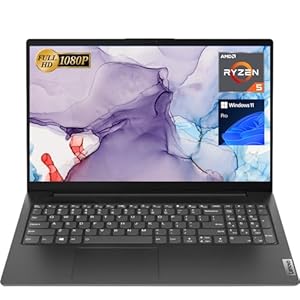
Lenovo V15 Laptop computer, 15.6…
【High Speed RAM And Enormous Space】16GB high-bandwidth RAM to smoothly run multiple applications and browser tabs…

Cellphone Tripod, 71″ Tripod …
【Tall Phone Tripod】 Phone tripod has an admirable Height, extending from 19.6 Inches to 71 Inches….

Flower Reed Diffuser Set Eucalyptus…
Exclusive premium woody floral fragrance: Top note>Lavender; Middle note>Juniper; Base Notes>Eucalyptus; Natural: Gentle and long-lasting aromatherapy…

TP-Hyperlink Tapo 1080P Indoor Safe…
【Motion Detection & Instant Notification】Get instant push notifications when motion, person or baby crying is detected,…

32mm Vacuum Attachments Equipment, …
Material: Vacuum cleaning kit are made of high quality PP material, portable and durable for long…
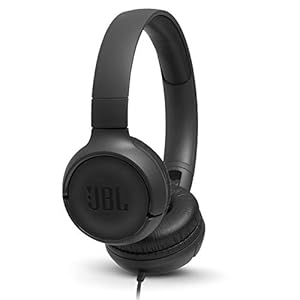
JBL Tune 500 – Wired on-ear h…
JBL Pure Bass Sound: It features the renowned JBL Pure Bass sound, which can be found…